

Top 10 Machine Learning Tools You Need to Edit Videos Faster
Discover the leading machine learning tools and tech tools of 2025 that accelerate video editing, streamline workflows, and improve creative output.
In 2025, machine learning tools and tech tools are reshaping how creators edit videos, providing automation, intelligent cropping, noise reduction, and scene detection that dramatically speed up workflows. The best tools integrate AI-powered features into familiar software apps, enabling editors to focus on storytelling while automations handle repetitive tasks. Whether you’re cutting social clips, producing long-form content, or batch-processing footage, these software apps deliver workflow optimization and higher throughput for teams and solo creators alike.
Table of Contents
- What Are Machine Learning Tools?
- Top 10 Machine Learning Tools for Video Editing
- Comparison Table
- FAQ
What Are Machine Learning Tools?
Machine learning tools in 2025 combine models trained on large audiovisual datasets with optimized inference pipelines to automate video editing tasks. These tech tools perform smart actions like automatic transcriptions, scene detection, color grading suggestions, object removal, upscaling, and smart cut suggestions. Integrated into software apps or available as standalone services, the best tools reduce manual overhead and enable editors to optimize workflows for faster delivery and consistent quality across projects.
Top 10 Machine Learning Tools for Video Editing
1. Runway

Runway is a cutting-edge machine learning tool designed for creators who need fast, intelligent video-editing features. It offers generative and assisted editing functions such as background removal, motion tracking, and video inpainting using state-of-the-art models. Runway’s real-time preview and cloud-based processing make it ideal for teams looking to scale video workflows without heavy local compute. As one of the best tech tools of 2025, Runway helps editors accelerate repetitive tasks and focus on creative decisions while benefiting from workflow optimization across projects and platforms.
2. Descript
Descript is a powerful machine learning tool that turns transcripts into the editing timeline, enabling editors to cut video and audio by editing text. Its AI-powered filler-word removal, overdub voice cloning, and automatic captions dramatically reduce editorial time. Descript integrates with common software apps and supports collaborative workflows, making it one of the best tools for creators and teams seeking efficient workflow optimization in 2025. By automating transcription and rough-cut creation, Descript helps editors produce polished videos faster with fewer repetitive steps.
3. Adobe Premiere Pro (Sensei)
Adobe Premiere Pro leverages Adobe Sensei machine learning to speed up complex editing tasks like auto-reframe, scene edit detection, color matching, and audio cleanup. As a long-standing industry tool, Premiere’s ML features integrate natively into professional workflows and support large projects and team pipelines. In 2025, these machine learning tools deliver improved automation, making Premiere Pro one of the most versatile tech tools for editors who need robust, customizable automation while retaining full manual control when required.
4. DaVinci Resolve (Neural Engine)

DaVinci Resolve’s Neural Engine brings machine learning to color grading, smart reframing, facial recognition, and speed warp retiming. These ML capabilities speed up editing and finishing by automating complex technical tasks while preserving artistic intent. For editors focused on high-end color and finishing, DaVinci Resolve remains one of the best tools in 2025—delivering workflow optimization that shortens delivery cycles without compromising visual quality, especially for teams handling large volumes of footage.
5. Topaz Video AI
Topaz Video AI specializes in machine learning-powered enhancement—upscaling, denoising, and frame-rate conversion—with exceptional image-quality improvements. For editors needing to rescue old footage or produce high-resolution exports quickly, Topaz’s ML models provide automated correction and enhancement workflows. As a focused software app in 2025, Topaz complements NLEs by offering batch processing and high-quality inference, making it a top choice among the best tools for video restoration and rapid turnaround projects.
6. Kapwing
Kapwing is an accessible, browser-based machine learning tool that speeds basic to intermediate video editing tasks like automatic subtitles, background removal, and smart cropping. Its collaborative, cloud-first approach makes Kapwing ideal for social teams and small studios that need quick edits without heavy software installs. In 2025, Kapwing’s integrations and AI features position it among the best tech tools for creators who want fast, shareable content and streamlined workflow optimization across platforms.
7. Pictory
Pictory leverages machine learning to transform long-form content into short, platform-ready videos by automatically selecting key moments, generating captions, and adding transitions. Its automated storyboard creation and text-to-video features accelerate content repurposing workflows and reduce manual editing time. For marketers and creators in 2025, Pictory ranks among the best tools for workflow optimization—especially when teams need many short-form outputs from longer recordings without dedicating extensive editorial resources.
8. VEED.IO

VEED.IO is a cloud-based machine learning tool that automates captioning, translation, noise reduction, and subtitle styling. Its simple UI and export presets help teams produce localized, platform-optimized video quickly. In 2025, VEED.IO’s AI features make it one of the best tools for creators focused on distribution and accessibility—speeding time-to-publish while preserving consistent branding and workflow optimization across social channels and marketing pipelines.
9. Auto-Editor
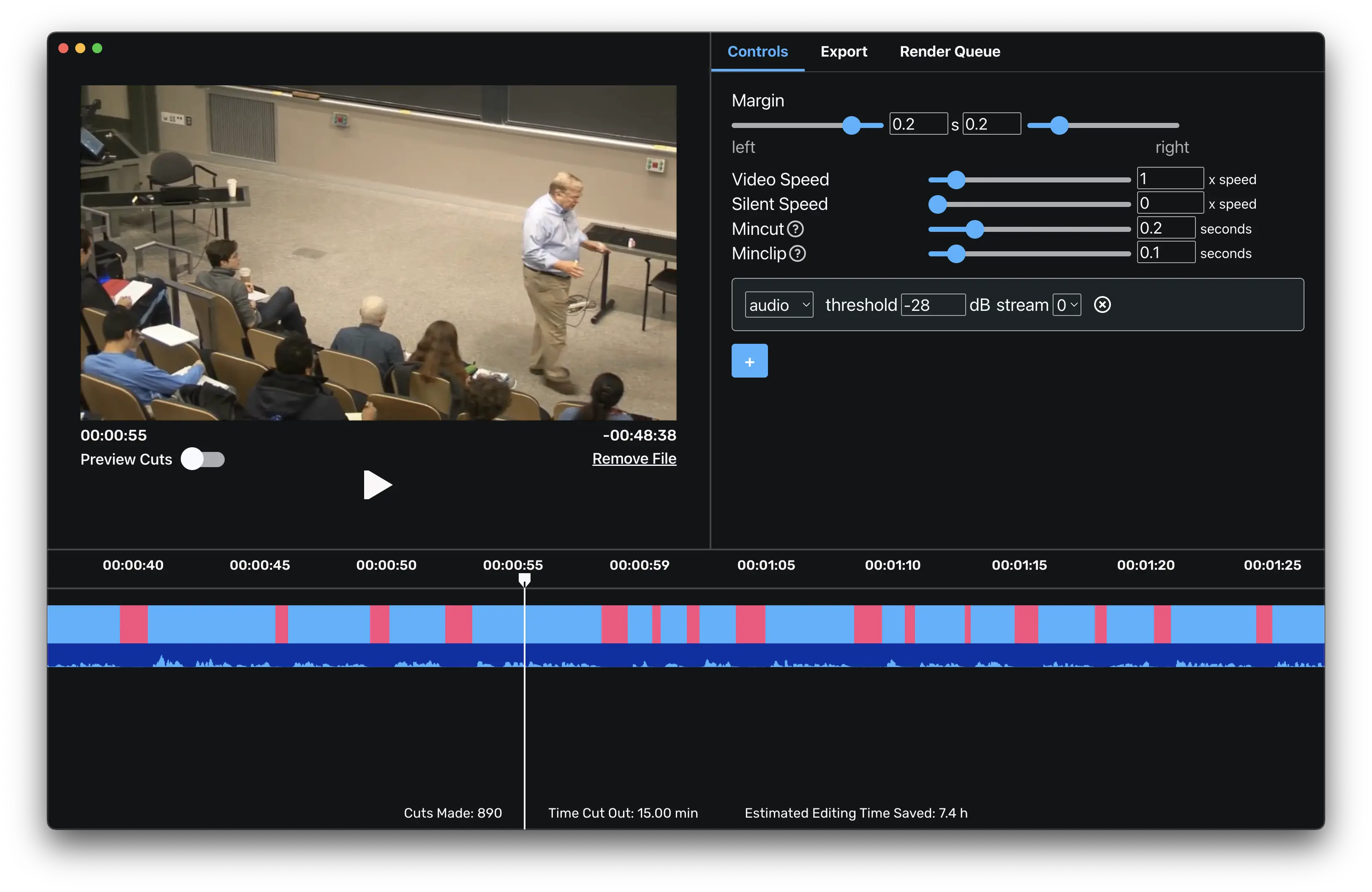
Auto-Editor is an open-source machine learning tool that automatically cuts silent sections, aligns cuts to speech, and produces tight rough edits using configurable rules. It’s ideal for batch-processing podcasts, interviews, or lecture videos where removing silence and filler is the priority. As a lightweight software app in 2025, Auto-Editor is valued among editors and developers who want fast, automated rough cuts and easy integration into larger processing pipelines for workflow optimization.
10. Synthesia
Synthesia offers AI-driven video generation and avatar-based narration that editors can use to create quick explainers, localized training videos, and mockups without studio shoots. Its ML-driven lip-sync and multilingual voice options speed content creation and reduce production complexity. In 2025, Synthesia is among the best machine learning tools for teams needing fast video prototypes, scalable localization, and workflow optimization when budget or time constraints limit live-production options.
Comparison Table
| Tool Name | Key Feature | Best For |
|---|---|---|
| Runway | Generative editing & inpainting | Creative teams & VFX |
| Descript | Text-based editing & overdub | Podcasters & video editors |
| Adobe Premiere Pro (Sensei) | Auto-reframe & color matching | Professional editors & studios |
| DaVinci Resolve (Neural Engine) | Smart color & facial recognition | Colorists & finishers |
| Topaz Video AI | Upscaling & denoising | Restoration & high-res output |
| Kapwing | Cloud editing & auto-subtitles | Social teams & creators |
| Pictory | Automatic highlight reels | Marketing teams & repurposing |
| VEED.IO | Auto captions & localization | Content publishers & educators |
| Auto-Editor | Automated rough cuts | Podcasts & batch editors |
| Synthesia | AI avatars & multilingual narration | Training & explainer videos |
FAQ
1. What are the best machine learning tools for video editing?
Top machine learning tools for video editing in 2025 include Runway, Descript, and Adobe Premiere Pro (Sensei). These tech tools provide automation, smart editing suggestions, and workflow optimization to speed production for creators and teams.
2. How do machine learning tools improve editing speed?
Machine learning tools automate repetitive tasks—transcription, scene detection, noise reduction, and upscaling—so editors spend less time on technical chores and more on creative decisions. These software apps optimize workflows by producing accurate first-pass edits and suggested fixes.
3. Are these tools suitable for professional studios?
Yes. Professional-grade tools like DaVinci Resolve and Adobe Premiere Pro include robust machine learning features that integrate into high-end pipelines, offering both automation for speed and precise controls for final quality.
4. Can machine learning tools be used for batch processing?
Absolutely. Tools like Topaz Video AI and Auto-Editor support batch operations, enabling teams to process large volumes of footage with consistent quality—an essential feature for workflow optimization in 2025 workflows.
5. Which ML tool is best for social video teams?
Kapwing, Pictory, and VEED.IO stand out for social teams due to fast auto-captioning, smart cropping, and quick export presets—making them some of the best machine learning tools for fast turnaround and platform-specific outputs.
Machine learning tools in 2025 offer powerful ways to edit videos faster by automating time-consuming steps, improving output quality, and enabling teams to scale production. Whether you need high-end color and finishing, automatic transcription, or rapid repurposing for social channels, the tools listed here provide workflow optimization and practical automation. Adopt the right combination of machine learning tools and tech tools to reduce manual work, improve consistency, and free your team to focus on the creative work that drives engagement and results.



0 Comments